Office networks · Limassol and Paphos
Office Wi‑Fi installation
We design, install and upgrade office networks in Cyprus. We separate access for staff, visitors and business devices, then test the network where your team works and holds meetings.
Seamless Wi-Fi
What goes into an office network
Staff access
Give staff access to the printers, meeting-room devices and internal services they need. Put cameras and other managed equipment on their own network where appropriate.
Visitor Wi-Fi
Visitors get internet access on a separate network. Internal services are isolated, and we can agree bandwidth limits for the guest network.
Wired and backup connections
We run Ethernet to access points and fixed devices. If a 2nd connection is available, we can configure automatic failover.
Separate network zones
One access point can serve several Wi‑Fi networks. Access rules decide what owners, staff and guests can reach.
Staff
Internet and business resources
Computers, printers and servers
Guests
Internet only
Internal network protected
Wi-Fi RF planning
Wi-Fi RF planning and coverage mapping
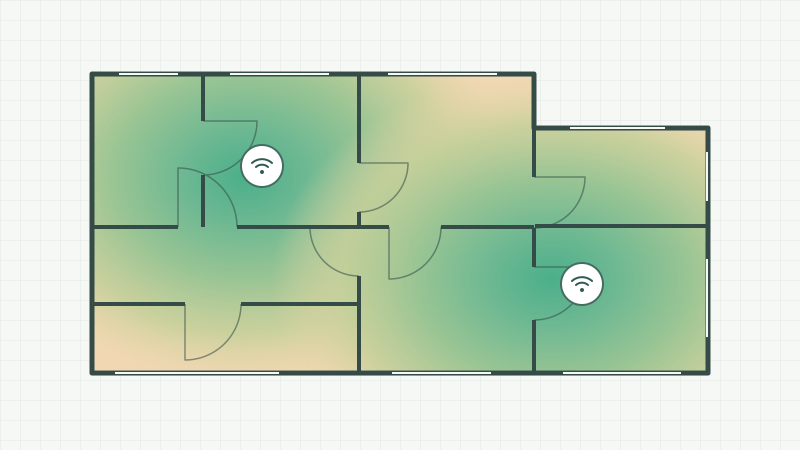
We build a predictive RF model that accounts for walls, floor slabs, the layout and busy areas. Its heatmap shows predicted coverage and helps us position access points before installation.
After installation, we measure signal strength and speed in the agreed areas. We test roaming by walking between access points during a call and adjust settings if needed.
Plan for desks and meeting rooms
We map meeting rooms, desks, reception and open work areas. The design accounts for partitions and the number of people likely to join a video call at once. After installation we check coverage and roaming in the agreed spaces.
How we work
Inspect
Tell us where the signal drops or share a floor plan. We check the existing router, cabling and the rooms you use.
Plan & quote
We propose access point positions, cable routes and a quote so you can approve the work.
Install
We mount and configure the equipment, then set up the networks you need.
Test & hand over
We measure signal and speed in the agreed areas, test roaming while walking through the property and show you how to manage the network.
Frequently asked questions
Can you upgrade Wi-Fi while our office is open?
We can usually phase the work by area. We check existing cabling and equipment first, then agree changeover windows for desks and services.
Can visitors see staff computers or printers?
We configure a separate guest network with internet access. Network rules block access to staff computers, printers and internal services.
How do you check Wi-Fi for video meetings?
We plan for the expected number of people and devices in meeting rooms. After installation we check signal and test video calls in the agreed areas.